

Sticky Password and the DOM Clickjacking Vulnerability
 Sticky Password
- August 22, 2025 , Sticky Password
- Password & security
A recent report presented by security researcher Marek Toth described a new attack method known as DOM-based extension clickjacking. In this article, we'll explain what this vulnerability means for password manager users, why Sticky Password users are protected, and what you can do to stay secure online.
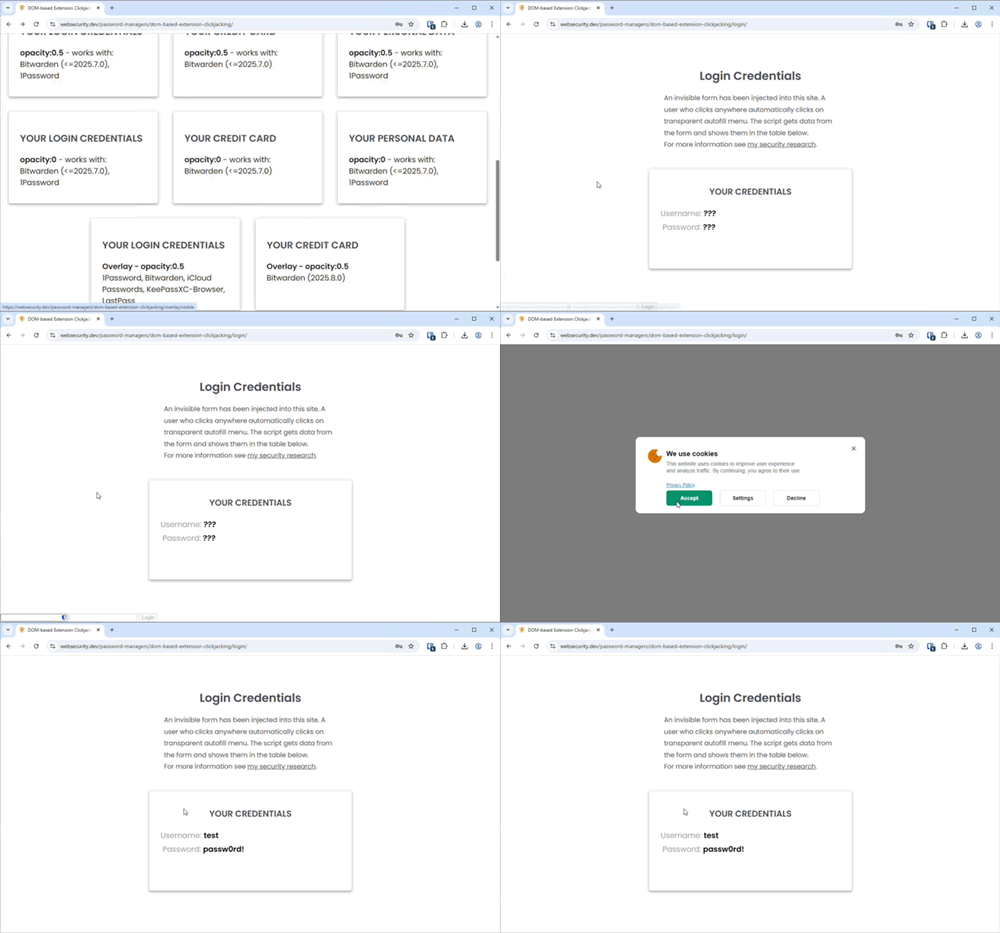
This technique targets browser extensions that add autofill features directly into the website you're visiting. The danger comes from the fact that malicious websites can secretly change or hide parts of the page you see — including elements placed there by extensions. This allows attackers to trick you into clicking on something that looks harmless but actually triggers autofill of sensitive data like passwords, one-time codes, or credit card numbers.
Think of it like an ATM: you believe you're pressing the Cancel button, but someone has secretly put a fake screen on top so that your click actually presses Withdraw. You're doing what looks safe, but in reality you've been misled into giving away your money. The same idea applies here, only with your online accounts.
Here's an example of how this attack works in practice. The image below shows how a malicious website could trick users into clicking on hidden autofill buttons:
Why Sticky Password Is Safe
Sticky Password is designed differently from other password managers. All sensitive operations, like encrypting data, showing the Sticky Password interface, and handling your clicks, happen entirely inside our native desktop and mobile app. They never run inside the web page itself, and not even inside the browser's own processes. This architecture ensures that malicious JavaScript on a site cannot manipulate Sticky Password's secure UI or trigger autofill without explicit user confirmation.
We do provide one small injected control - a Sticky Password button in the input fields, for user convenience. Importantly:
With Sticky Password's security architecture:
- Clicking the Sticky Password button does not trigger autofill.
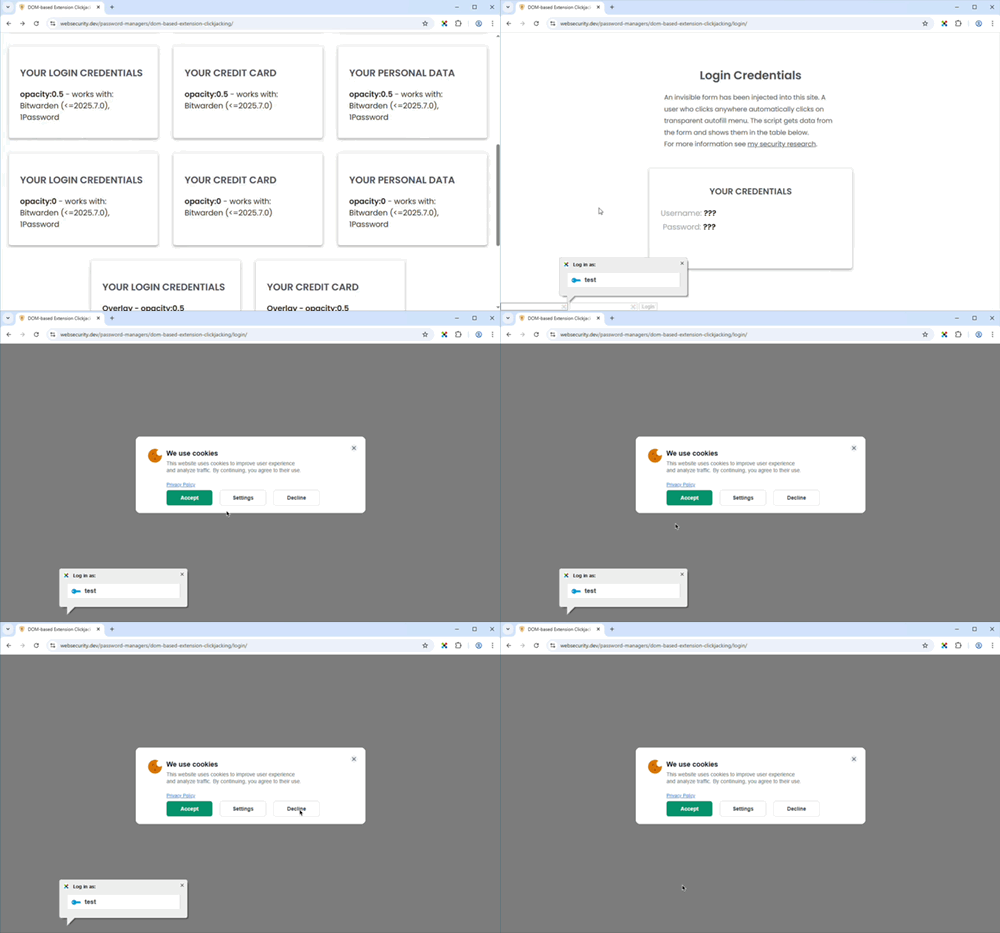
- At most, a clickjacking attack (tricking the user into clicking this button) could cause user confusion by displaying additional Sticky Password UI unexpectedly.
- In such a case, no sensitive data is filled automatically. Autofill only occurs if the user explicitly confirms the action through Sticky Password's native dialogs.
Here's how Sticky Password's secure architecture prevents this type of attack:
Guidance for Users
Sticky Password's autofill prompt normally appears when you focus a login or password field — or right after a page opens if such a field is already focused. If the prompt appears outside of these moments, treat it as suspicious and do not confirm autofill for passwords or credit cards.
We also recommend that you do not enable the option "Autofill for all accounts" unless you have a serious need for it, as described in this article. Keeping autofill restricted adds another layer of protection against confusion or manipulation.
We are also implementing additional safeguards to further reduce even the possibility of confusion from this type of attack vector.
Bottom Line
Sticky Password's architecture protects users from DOM-based extension clickjacking. At worst, a malicious website could cause a harmless UI prompt to appear, but your data remains secure.