

App Permissions on Your Phone: What Apps Can Really Access (and Why It Matters)
 Sticky Password
- August 13, 2025 , Sticky Password
- Password & security
App permission refers to the process of providing access & control of your device every time you download a new application. It defines what data, or features you allow the specific application to access on your device. It includes, but is not limited to location, camera, contacts, gallery, microphone, memory, etc.
Tapping ‘allow’ might seem a small action, but it can lead to significant implications if not monitored closely. Most non-technical users do not realize that by allowing an application to control their phone, they are giving permission to use their private data pretty much however the developers of the app want to. In order to understand the consequences, we need to educate users on how to use monitor request features on devices carefully.
What Are App Permissions?
We’ve all been there. Installing a new app and every time, it requests accessing your contact list, camera, gallery, location, etc. Sometimes those permissions are necessary for the application to perform optimally. In other cases, many applications try to gain data for hidden business gains, or data theft motives.
Let’s look into each of these aspects.
Why Some App Permissions Are Actually Necessary
Not all permissions are harmful. Some are necessary to improve the functionality and user friendliness. Thus, it’s important to keep a balance between caution and convenience.
There are several reasons why apps ask for permission, let’s check below:
App Functionality
App functionality determines the overall value and usability of an app. It refers to how a user can avail its features and capabilities to perform a specific activity or task on his device. Allowing permissions for each app is necessary for it to function properly.
For example, you can send messages through WhatsApp to your contacts only if you allow it to use your contact list. Just like that, you can instantly capture & upload a photo to your Instagram story, only if you permit Instagram to use your camera. It’s how every application on your device functions properly.
If you don’t allow any of those apps, they won’t be functional optimally. Thus affecting the user experience.
User Experience
This one is interlinked to what we mentioned above. The second reason why permissions are crucial is, they allow applications to perform optimally which gives a great user experience in return. This kind of seamless interaction not only benefits the user but also supports more effective lead nurturing efforts by keeping users engaged and guiding them naturally through the app, allowing easy navigation, intuitive experience, and avoiding unnecessary pop-ups.
For example, most fitness apps use specific features of your device including, sensors, activity tracking, calendar, the phone's GPS, push notifications for reminders and alerts, to provide you accurate information regarding your workout schedule or fitness goals. Without these you won’t be able to track your personal target, wins or achievements.
Security and Privacy
Not all requests for permissions are a threat to your security and privacy. Data access needs to be a privilege, and not a right. If an application accesses your device by default, it can compromise data security, especially when downloading suspicious applications.
Various applications only request permission where necessary. For example, a calculator on your device shouldn’t request access to your camera or your contact list or photos. If it does, it’s simply overreach: it’s necessary that all apps should have appropriate access rights. In such cases, we should say ‘no’.
What Happens When You Tap 'Allow'?
When you tap allow, you grant permission to access various features like camera, microphone, contacts, etc on your phone. You can also alter permission on your device anytime you want by going into the ‘app & permission’ section on Android.
Your device will ask you, if:
- The permission would be on continuous basis
- Only when the application is being used
- Or will ask you for permission when you open the app
Common types of requests are:
- Location: Used by apps like Starva, Google Maps or fitness trackers to provide navigation or activity tracking.
- Camera & Microphone: Required for recording, live streaming, or video conferencing in apps like Google Meet, Zoom or Instagram.
- Contacts: Needed by communication apps such as WhatsApp, WeChat, or Botim for calling and syncing your contact list.
- Storage & Files: Accessed by apps like PDF readers to open, save, or manage files on your device.
- Health Data: Collected by wearable-compatible apps to monitor and track fitness or health-related metrics.
Users can choose based on their specific needs. For example, if you use WhatsApp to make calls more frequently, you probably wouldn’t want to use the option, ‘ask every time when you open the app’ instead you can give it continuous permission.
Real-world examples of data usage during in-app permissions
Let’s suppose you’ve just downloaded WhatsApp on your device. The moment you try to open it, it will ask for permission to your contacts, microphone, camera, media etc.
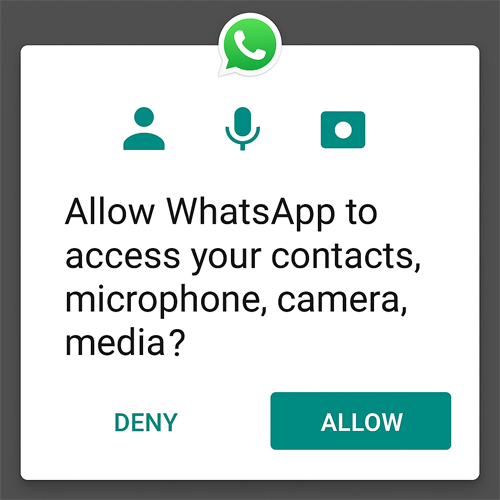
Once you allow it, WhatsApp accesses all your contact details, camera, microphone, so that you can make calls easily. If you deny access, you will not be able to make a call using WhatsApp.
Permissions that seem harmless but aren’t
The term ‘Permission Abuse’ is common for applications that unnecessarily want to approach your personal data. For example, a shopping platform might ask for your phone location or gallery before even you start browsing the products. One careless tap on allow option can invade your privacy and data, and access all your family info on the phone.
Data Theft and How to Avoid It
Data theft is a serious challenge users face online, and it can be the result of app approachability to your device. For organizations developing or managing mobile apps, it’s critical to test for vulnerabilities before they reach users.
The following risks can arise when careless access is granted:
- Privacy invasion
- Targeted ads (including behavioral and contextual targeting) and profiling
- Data breaches and misuse
- Location tracking and security threats
How to Identify Suspicious App Permissions
Always consider the following cases when using an application to identify whether or not it’s a suspicious app:
- Apps requesting irrelevant permissions - A fitness application might ask you to approach your phone gallery.
- Vague permission descriptions - A shopping platform asking for permission to reach your contact list.
- Poor reviews mentioning suspicious behavior - Always look for reviews when installing.
Final Thoughts
Understanding and managing permissions and access requests is no longer optional, it’s essential for protecting your personal data. Stay informed, stay cautious, and take control of what your apps can access.