

Are Password Managers Safe? The Truth About Security and Risks
 Julie Ladaniuk
- April 8, 2026 , Julie Ladaniuk
- Password & security
Passwords are everywhere, from setting up a new smartphone to making an online purchase or accessing government services. Remembering dozens of logins is nearly impossible, and reusing one password across multiple accounts isn’t safe. Here’s why you shouldn’t.
The idea of putting all your credentials “in one basket,” for example into a dedicated app, makes many people uneasy. So the big question remains: are password managers really safe?
Let’s take a closer look at how they work, how they protect your data, and what risks to be aware of.
Are Password Managers Safe? A Clear Answer
Yes. Password managers are one of the safest ways to store and manage your credentials because they use strong encryption, secure storage, and zero-knowledge architecture. Certain tools also provide flexible sync options, including cloud and local storage.
However, their safety also depends on how they are used. Weak master passwords, compromised devices, or phishing attacks can still expose your data.
What Are the Biggest Password Security Risks?
In 2026, password security risks are more advanced and widespread than ever. AI-generated phishing and credential-stuffing attacks continue to grow, making strong password practices more important than ever.
According to research by Cybernews, which analyzed more than 19 billion exposed credentials leaked between April 2024 and April 2025, an overwhelming 94% were reused or duplicated. Only 6% were unique, and “lazy” choices such as “qwerty,” “password123,” and “admin” remain extremely common, even as security awareness improves.
Other common risks include:
- Data breaches exposing millions of logins through third-party platforms
- Malware or keyloggers capturing typed information on compromised devices
- Social engineering schemes that trick users into revealing sensitive data
- Man-in-the-Middle attacks on unsecured public Wi-Fi
- Passwords shared or stored insecurely in notes, messages, or browsers
- Brute-force attempts targeting short or predictable combinations
- Browser autofill features that lack robust security protections
- Poor device hygiene, such as outdated software or missing screen locks
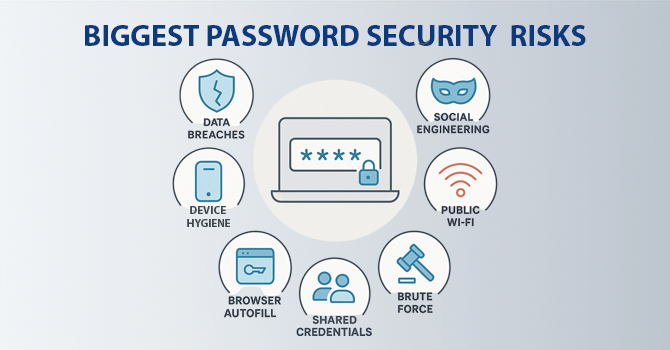
This shows that smart and secure password management is no longer a “nice to have,” but an essential part of modern online safety.
Common Password Manager Security Concerns (Explained)
In 2026, Sticky Password celebrates its 25th anniversary. This experience in digital security helps us clearly identify and explain the most common misconceptions about password managers.
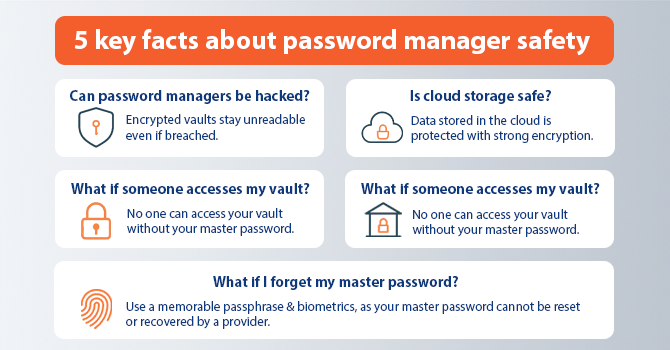
1. “Can password managers be hacked?”
The truth is that nothing in the digital world is ever 100% guaranteed. However, leading solutions use end-to-end encryption and zero-knowledge architecture. Even if hackers breach a provider’s servers, your encrypted data remains unreadable and inaccessible.
2. “Is cloud storage safe?”
Storing logins in the cloud can feel unsettling, but the data is protected with strong encryption. If you choose online sync, your vault cannot be accessed without your master password, which is known only to you and never stored by the app.
3. “What if someone gets access to my vault?”
What is the use of a locked safe without knowing the combination? The same applies here. Without your master password and authentication factors, no one can open your encrypted vault. Even if someone gains physical access to your device, the data inside remains protected.
4. “What if I forget my master password?”
That is a valid concern and one that highlights the strength of zero-knowledge security. Since the master password is never stored anywhere, even the provider cannot recover or reset it. Only you can decrypt your data.
To avoid lockout, choose a strong but memorable passphrase and use features such as:
- Biometric login (Face ID, fingerprint)
- Emergency access for trusted contacts.
The good news? Your master password is the only one you’ll ever need to remember, and it’s worth the effort.
5. “Can I really trust the password manager provider?”
Some users worry that the company behind their security tool might see or misuse their data. Reputable providers like Sticky Password follow a zero-knowledge policy.
This means:
- Encryption and decryption happen locally, on your device
- Your master password never leaves your device
- Even the provider cannot access your stored information
How Password Managers Keep Your Data Safe
The security and reliability of a password manager depend on several key factors:
Local vs. Cloud Storage
Some apps store vaults locally on your device, giving you full control and offline access. Others sync via the cloud for multi-device convenience. As long as encryption and zero-knowledge principles are in place, both methods are safe.
Sticky Password offers both options, giving you the freedom to choose how your data is stored and accessed.
Reputation and Transparency
Choosing an experienced and trusted provider is key. Longevity in the industry often reflects reliability and consistency. Reputable vendors are transparent about their encryption methods and remain committed to safeguarding user data.
Regular Updates and Multi-Platform Security
Reliable tools are updated frequently to stay ahead of evolving threats, adding features such as Breach Monitoring or a Passphrase Generator. Consistent protection across desktop, mobile, and browser extensions ensures your credentials stay secure everywhere you use them.
Modern password managers add layers of protection, including AES-256 encryption, zero-knowledge architecture, and Dark Web Monitoring, keeping your data private and protected from emerging threats.
How to Choose a Secure Password Manager
Now that we’ve, dare I say, eased your concerns about safety and trust, let’s walk through a simple checklist for choosing a secure and user-friendly password manager.
✔ Transparent security policy. Look for a provider with a strong track record and clearly defined security practices.
✔ Two-factor authentication (2FA). Ensure the tool supports 2FA to add an extra layer of protection to your account.
✔ End-to-end encryption. Verify that your data is encrypted on your device and can only be decrypted by you, not the service provider.
✔ Local storage option. If privacy is your top priority, choose a tool that allows you to store data locally on your device instead of only in the cloud.
✔ Independent reviews and reputation. Check trusted tech sites or user communities for unbiased insights into how different tools perform in everyday use.
When comparing options, consider your personal privacy and usability needs. The best password manager is the one that balances strong protection with everyday convenience.
Final Thoughts
Good digital hygiene and smart credential management are essential for staying safe online.
Now that you understand how password managers work and what risks to watch for, the answer is clear.
If you have not yet found the right solution, you can try Sticky Password, a secure and private password manager trusted by users worldwide.