

Strong Password Examples That Are Actually Secure in 2026
 Pete
Pete
- January 22, 2026 , Pete
- Password & security
Creating a strong password in 2026 means using long, unique, unpredictable credentials — ideally generated and stored by a password manager. Modern password security focuses on entropy, uniqueness, and protection against automated and AI-assisted attacks, rather than human memorization alone.
Imagine trying to remember this:
fR7!cP02mv9@QeZ8Lw#3Great password, right? Today, we’re told to create them like this — long, strong, unique.
Now imagine remembering that…plus 120 more sets of characters just like it, one for every email account, banking site, streaming service, shopping app, Wi-Fi login, and everything else in your digital life. No one can do that. No one was ever meant to do that.
But that’s exactly what most advice on how to create strong passwords sounds like when you first hear it: Use long passwords. Make them complicated. Don’t reuse anything. Change them if they get weak.
It’s good advice, but impossible for an ordinary person to follow without help: no human brain is designed for this. Strong, long, unique passwords aren’t a human skill. They’re a tool-assisted skill.
You can’t memorize 20 random characters for every account you own, keep track of which login belongs where, and maintain them at the pace today’s internet demands. But a password manager can. Effortlessly.
That’s why today’s password best practices are less about how clever you are and more about using the right tools.
Why Strong Passwords Still Matter in 2026
Despite the rise of biometrics and passkeys, most online accounts still rely on passwords. And attacks against weak credentials are faster and more automated than ever.
- AI-powered attacks crack weak passwords instantly
Modern tools don’t guess randomly — they use pattern recognition, leaked-password training data, and GPU power to break weak or predictable passwords in seconds.
- Password reuse continues to fuel the majority of breaches
One of the most common password mistakes is reusing the same login across multiple sites. If one reused login credential leaks, attackers try it everywhere (credential stuffing). This remains one of the most effective attack methods today.
- Billions of exposed passwords feed automated tools
Large breach databases allow attackers to skip “guessing” altogether. If your password has been in a leak, it’s already compromised.
- 2FA is important — but still not enough
Strong 2FA helps, but it can’t compensate for weak or reused passwords. The one you use to sign in is still the first lock on the door.
- Security hygiene still begins with strong credentials
Even as authentication evolves, the strength of your primary sign-in method remains essential — and still one of the most effective ways to protect online accounts.
What Counts as a Strong Password in 2026?
Security guidance has evolved. Pure complexity is no longer the main goal — a smarter balance of password length vs complexity is.
Strong Password Requirements
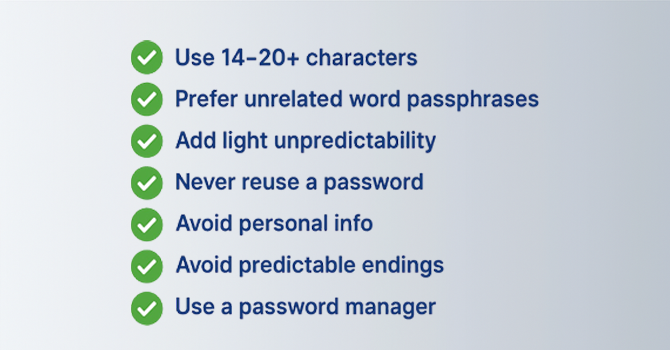
A strong password typically meets the following requirements:- 14+ characters (20+ preferred)
- Unrelated words or random characters
- No personal information
- No common substitutions or patterns
- Never reused
- Stored in a password manager
Follow these secure-password guidelines and focus on entropy — the true measure of unpredictability.
Password Entropy, Simply Explained
Password entropy measures how difficult a password is for automated tools to guess or crack.
- Passw0rd! → Low entropy
- coffee-planet-river-sunset → High entropy
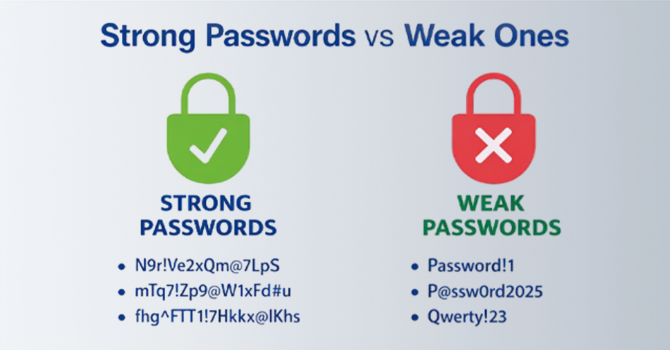
- mQ7!Lp9#Qe2@Fs8^ → Very high entropy
The rule is simple: longer + less predictable = stronger. This principle is the foundation behind modern strong password examples.
Passphrases vs Passwords
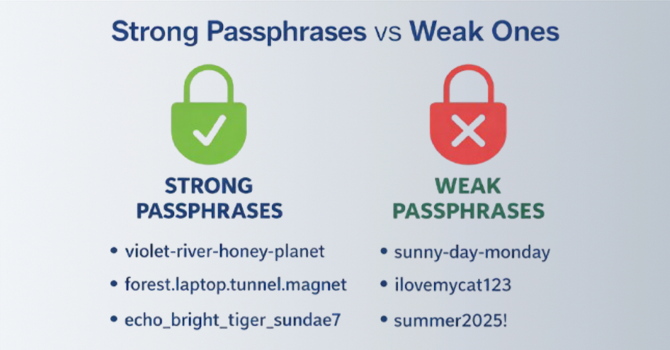
PassphrasesBest for the few logins that need to be memorized: long, memorable, high-entropy. Example: orbit-lantern-ocean-jazz
Random Passwords
Best for everything else: unique, complex, and generated by a password manager, so you never have to memorize them.
Use passphrases for memory, and the password manager for everything else.
How Hackers Crack Weak Passwords Today
Understanding how attacks work helps you avoid them.
- AI-powered brute-force & pattern prediction
Cybercriminals now use AI tools that can guess millions of combinations per second and recognize human patterns — breaking predictable logins almost instantly.
- Credential stuffing
Attackers take email/password pairs leaked in data breaches and automatically try them on other services, hoping the victim reused the same details.
- Phishing and social engineering
Hackers send realistic emails, texts, and fake login pages to trick users into revealing their credentials directly.
- Predictable patterns
Names, birthdays, keyboard sequences, and common words and phrases are tested first.
Weak logins often fail because human-created patterns are easy for automated systems to anticipate.
How to Create Strong Passwords in 2026 (Step-by-Step)
A simple formula works reliably: Long + Unique + Slightly Unpredictable.
Step 1 — Start with a long passphrase
Choose four unrelated words to create a solid base.
Example: tulip-river-orange-satellite
Step 2 — Add a small unpredictable element
Introduce a symbol, number, or uppercase shift to increase complexity.
Example: tulip-river_orange-Satellite7
Step 3 — Avoid personal info and common patterns
Skip birthdays, pet names, keyboard sequences, or common substitutions.
Step 4 — Never reuse any password
Recycling credentials is one of the quickest paths to account compromise.
Step 5 — Use spacing, punctuation, or symbols for entropy
Tiny changes add significant difficulty for automated cracking tools.
Put together, the structure looks like this:
Passphrase (4 random words) + small twist + account-specific variation.
Strong vs Weak Credential Examples
Crack Time
- Weak 8-character password → Instantly
- Predictable 10-character password → Minutes
- Long passphrase → Centuries or more
- Random manager-generated password → Millions of years
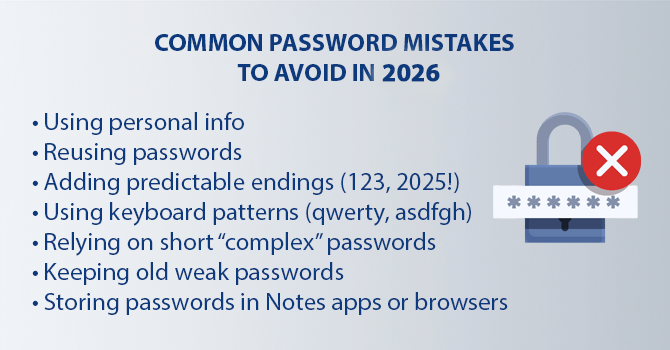
Common Password Mistakes to Avoid in 2026
Why a Password Manager Is Essential in 2026
You can’t manually create or remember strong logins for every account. A password manager solves this by:
- Generating strong, one-of-a-kind passwords
Creates complex combinations that are far harder for attackers to guess or crack.
- Storing them in an encrypted vault
Your logins stay protected behind industry-standard encryption.
- Protecting against phishing
Autofill works only on legitimate sites, helping you avoid fake pages.
- Syncing securely across devices
Your latest logins stay available wherever you work or browse.
- Managing passkeys as adoption grows
Handles passkeys as they continue gaining adoption across major services.
Relying on a secure vault app is now the most realistic way to keep your digital life protected.
Sticky Password also offers features like local Wi-Fi sync, Dark Web Monitoring, and soon, passkey support for even stronger convenience and security.
Are Passwords Becoming Obsolete? (A Quick Reality Check)
Use of passkeys is growing, but passwords are still required for:
- The majority of websites
Full passkey support remains limited across the broader internet.
- Legacy enterprise systems
Older tools and workflows continue to rely on established sign-in methods.
- Fallback and account recovery
Even services that support passkeys often require a classic login for resets.
- Small business platforms
Many smaller apps and services have not yet implemented modern authentication.
- Aging infrastructure
Government, education, and long-running SaaS products upgrade slowly.
Passkeys are the future, passwords are the present.
Password managers help bridge the transition — supporting existing sign-ins while preparing for passkey-based access as adoption grows.
Final 2026 Checklist for Creating Strong Passwords
You don’t need to remember stronger passwords — you just need stronger tools.