

5 Common Password Mistakes in 2026 (and the Fixes That Actually Work)
 Pete
Pete
- February 25, 2026 , Pete
- Password & security
Common password mistakes still cause most account takeovers today — not because people don’t care, but because the “easy” options (reusing logins, browser storage, skipping 2FA) are built into everyday habits. This guide breaks down the most common password mistakes and shows the fastest fixes you can apply today.
One more 2026 update: avoid using public AI chatbots to generate passwords. A recent analysis by cybersecurity researchers at Irregular found that popular AI tools often produce passwords with predictable structures instead of true cryptographic randomness, making them easier to crack than they appear.
Most security breaches are not caused by sophisticated hacking. They happen because of common password mistakes that quietly weaken multiple accounts at once.
In this guide, we’ll walk through five of the most damaging habits and show you how to fix them.
- Reusing the same password on multiple sites
- Creating passwords that look strong but are predictable
- Saving logins in browsers or notes apps
- Skipping two-factor authentication (2FA)
- Never auditing or updating old credentials
A Quick Example: How One Password Can Open Every Door
Frank was proud of his password. It was long. It was weird. It had numbers, symbols, and capital letters in all the right places: 1LUV;Kittens&drag0ns. It wasn’t just a line of characters; it was his masterpiece. He used it everywhere from streaming services to his email and even his bank. After all, it was super strong, right?
What Frank didn’t realize was that he was making one of the most common password mistakes: reusing the same credentials across multiple accounts. When one of the sites he used was breached, 1LUV;Kittens&drag0ns landed on the dark web along with his email address. It didn’t take long for attackers to start plugging those credentials into other services. Frank had no idea that a single exposed password could open so many doors.
That mistake is more common than most people realize.
Reusing Passwords and the Risk of Credential Stuffing
Password reuse is one of the fastest ways to lose control of multiple accounts. When one is compromised, every other service using the same credentials becomes vulnerable as well. A single data breach can expose your email and password combination, giving attackers a starting point for automated account takeover attempts.
This tactic, known as credential stuffing, is incredibly effective.
What is credential stuffing?
Credential stuffing is a type of cyberattack in which attackers use previously leaked usernames and passwords to try logging into other websites. It works because many people reuse the same password across multiple accounts.
Because the process is automated, attackers can test thousands of login combinations in minutes. Even strong passwords can fail if they are reused.
Fix it: Use a password manager like Sticky Password to generate unique logins for each account. With all your credentials securely stored in one encrypted vault, you’ll only need to remember a single Master Password to access everything safely.
Creating Predictable Passwords That Look Strong
You know the type: P@ssw0rd!, HarryPotter!, Steelers2026.
These might look secure at a glance, but they follow predictable patterns that password cracking tools are designed to detect. Substituting letters with numbers or adding a symbol at the end does not make a password truly strong.
In 2026, password strength is determined far more by length and randomness than by complexity alone. Security experts generally recommend using at least 16 characters. Longer passphrases made of unrelated words are significantly harder to crack than short, complex-looking strings.
Fix it: Focus on length and unpredictability. Use passphrases (16-20 characters, the longer the better), or rely on a password manager to create a secure, random string automatically.
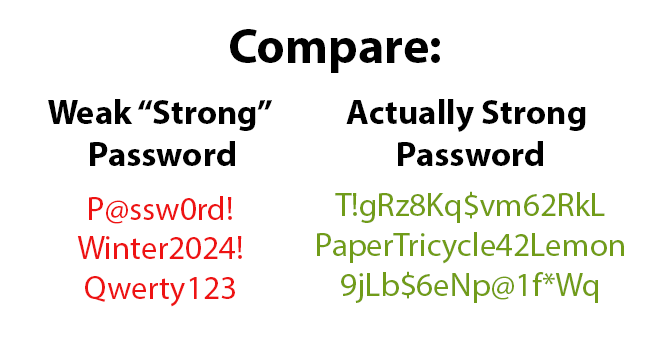
Remember: real strength comes from length and randomness, not just symbols.
Saving Passwords in Your Browser or Notes App
It’s quick. It’s easy. It’s also risky.
Many people underestimate the security risks of storing credentials in their browser or a notes app. If your device is lost, stolen, infected with malware, or accessed by someone else, those saved logins may be exposed.
Most browsers are not designed as standalone security tools. Their built-in storage is convenient, but it does not include advanced features such as security auditing, breach alerts, or cross-device protection.
Fix it: Store your credentials in a secure, encrypted vault with zero-knowledge architecture. Dedicated password managers such as Sticky Password are built specifically to protect login data rather than simply store it.
💡 Learn how Sticky Password protects your data against breaches
Skipping Two-Factor Authentication (2FA)
We get it — logging in with a code can feel like an extra step.
But 2FA is one of the simplest, most effective ways to block unauthorized access, even if someone has your login details. If you have not enabled it yet, now is the time to do so.
What is two-factor authentication?
Rather than depending on a single password, access is granted only after a second verification step is completed. This may involve entering a temporary code, approving a request in an authentication app, or using a hardware security key.
Fix it: Enable 2FA on your:
- Email accounts
- Banking and finance apps
- Cloud storage (Google Drive, Dropbox)
- Social media profiles
Never Auditing or Updating Your Passwords
Old passwords can remain active for years without being reviewed. If any of them were exposed in a past data breach, you may not even know it. Many security incidents begin with credentials that were leaked months or years earlier.
If you haven’t changed yours since 2018, it might already be floating around on the Dark Web.
How often should you change your passwords?
Security experts no longer recommend automatic password resets on a fixed schedule. Instead, focus on risk-based updates: change them after a data breach, if you suspect unauthorized access, or when older credentials are weak, reused, or outdated.
What is a password audit?
A password audit reviews your accounts to identify weak, reused, or compromised credentials. It helps uncover logins that need stronger protection and reduces the risk of account takeover.
Fix it: Run a regular security checkup using a password manager that can detect weak, reused, or exposed logins. Regular reviews help reduce the risk of unauthorized access.
Quick Self-Test: How Secure Are Your Password Habits?
Give yourself 1 point for each mistake you’ve made recently:
- Reusing passwords
- Using simple or predictable passwords
- Storing passwords in unsafe places
- Skipping 2FA
- Ignoring security audits or updates
- 0–1: Cybersecurity Champion 🛡
- 2–3: You’re on your way — time to level up
- 4–5: It’s time to strengthen your security habits.
Final Takeaway: Protect Your Accounts Today
You don’t need to be a tech expert to strengthen your online security. A few smart changes can dramatically reduce your risk.
Using a dedicated password manager makes it easier to create unique credentials, enable two-factor authentication, and monitor your accounts for weaknesses.