

Password Compromised? What to Do Immediately (Step-by-Step Guide)
 Pete
Pete
- April 29, 2026 , Pete
- Password & security
If your password is compromised, act immediately. Change it, check where else it was used, enable 2FA, and secure your most important accounts first. Acting quickly can stop attackers before they gain access.
In short: Credentials exposed in a data breach do not automatically mean your account was hacked — but they are no longer safe to use.
Don’t panic: this situation is common, and taking the right steps now is usually enough to secure your accounts.
What Does It Mean When Your Password Is Compromised?
When a password is compromised, it means your login details have appeared in a data breach and are now circulating in databases used by attackers.
These databases are often combined with automated tools that test exposed credentials across multiple websites in seconds, a method known as credential stuffing.
This is why compromised credentials are dangerous: they can be tested at any time using automated tools. The actual risk depends on where they were used and whether additional protections, such as 2FA, are in place.
Don’t Panic — Most Breaches Aren’t Your Fault
And that’s why the important thing isn’t blame. It’s response.
Data breaches happen every day, and even careful people get caught in them. The real risk starts when leaked passwords are reused across multiple accounts.
The moment you learn your password is compromised is actually a moment of power. Now you can act before attackers do.
Can Someone Hack You If Your Password Is Compromised?
Short answer: yes — but not automatically.
When credentials are exposed, they can be picked up and tested by attackers. However, access usually happens only if certain conditions are met, such as password reuse or missing additional protection.
The risk is higher if the same login was used across multiple accounts or if protections like two-factor authentication (2FA) are not enabled.
That’s why acting quickly matters. Taking the steps below helps reduce the chance of a compromised password turning into a real account takeover.
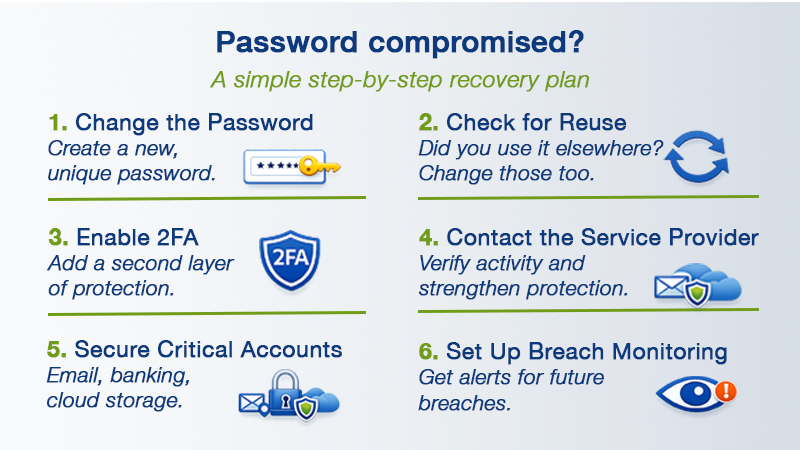
Step 1: Change the Compromised Password Immediately
If your password was exposed, change it immediately on the affected account.
This is the most important step to prevent unauthorized access.
When updating it:
- Create a long, unique password
- Don’t reuse an old one
- Don’t “tweak” it (for example, by adding a “1” or “!”)
If you’re using a password manager, generate a completely random one. Alternatively, use a passphrase generator tool to create long, strong and memorable passphrases in seconds. They’re especially useful for securing important accounts or creating a strong Master password.
Step 2: Check for Password Reuse on Other Services
This is where a breach can spread.
If the same password was used on multiple accounts, attackers can try it elsewhere using automated tools. This is one of the most common ways accounts get compromised and a leading cause of breaches, as highlighted in Verizon’s Data Breach Investigations Report.
So ask yourself:
- Did I use this password for email?
- Banking?
- Social media?
- Cloud storage?
If yes, those accounts need new passwords too.
There is no “fix everything” button. You secure accounts one by one — and that’s what stops the breach from spreading.
Step 3: Enable Two-Factor Authentication (2FA)
If the affected account offers two-factor authentication, turn it on.
Even if someone has your old password, 2FA adds a second layer of protection, usually a code from your phone or an authenticator app.
This significantly reduces the risk of unauthorized access.
This step is especially important for your primary email. Your email controls password resets for nearly all your other services.
Step 4: Contact the Service Provider If Sensitive Data Is Involved
If the breached account involves banking, investments, payment services, or sensitive personal data, contact the company directly, even if you’ve already secured your login.
Why does this matter?
Because the company may have access to security information you can’t see, such as unusual login attempts, location changes, or suspicious transaction activity.
Ask them:
- Was my account directly accessed?
- Have there been suspicious login attempts?
- Are there additional security steps you recommend?
- Should I monitor for fraudulent transactions?
Banks and financial institutions often have internal monitoring tools that customers don’t have access to. Notifying them creates a documented record and may trigger extra safeguards on your account.
If the situation involves money, this step can make a real difference.
You’re not accusing them. You’re informing them and protecting yourself.
Step 5: Prioritize Your Most Critical Accounts
If multiple passwords were compromised, prioritize the accounts that can cause the most damage if accessed:
- Banking and financial services
- Cloud storage
- Social media
- Shopping accounts with saved payment methods
Work methodically. One account at a time.
Trying to fix everything in a panic leads to mistakes. Taking structured action restores control.
This is one of the most effective ways to recover after a password breach without losing access to your accounts.
Step 6: Monitor for Additional Data Breaches or Credential Exposure
Sometimes you don’t discover a breach until long after it happened. That’s why breach monitoring tools matter.
Dark web monitoring alerts you when your email or login credentials appear in known data leaks, so you can respond quickly instead of finding out too late.
Sticky Password’s Dark Web Monitoring and Security Insights notify you if your credentials are found in known breaches, helping you act quickly before attackers can take advantage.
Learn more:
- Dark Web Monitoring overview
- How Sticky Password protects your data against breaches
- What to do if your email and password were found on the dark web
- Security Insights explained
The earlier you know, the easier recovery becomes.
What Not to Do After a Password Is Compromised
- Don’t ignore it.
- Don’t assume it “won’t happen to me.”
- Don’t reuse a different old password.
- Don’t wait until something worse happens.
Breaches are common. Account loss is preventable.
Final Thoughts: Stay Calm and Take Control
A breach is not a verdict. It’s a warning.
When your password is compromised, the solution is simple: act quickly and follow the steps above to secure your accounts.
You can’t stop every breach. But you can stop a breach from becoming a disaster.